Dyno Lab (JupyterLab Extension)
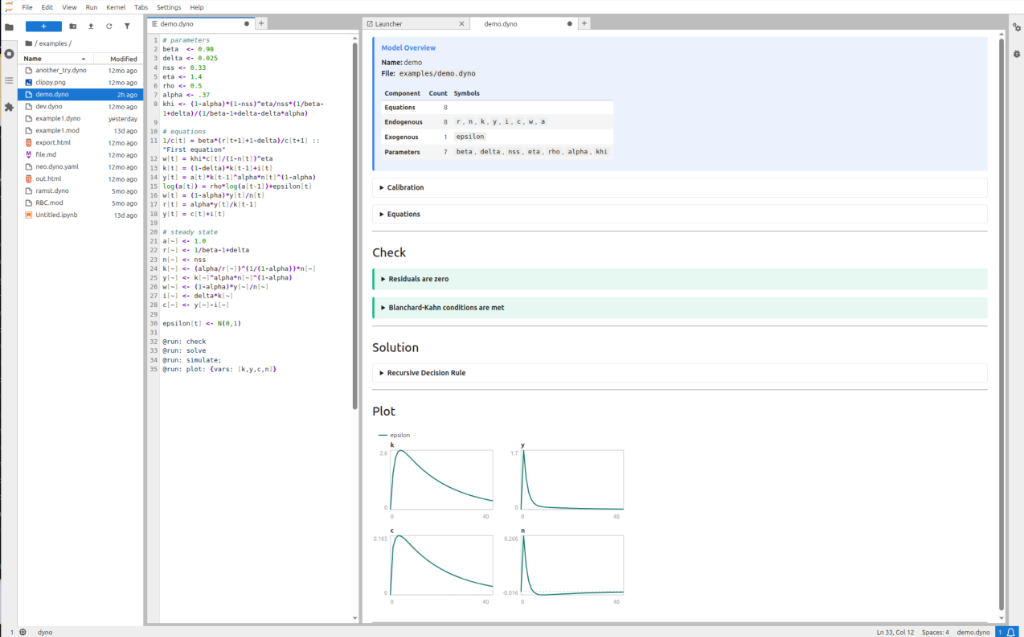
Dyno Lab (jupyterlab_dyno) is the official interactive extension for DSGE and macroeconomic modeling in JupyterLab. It provides a synchronized, side-by-side workspace: edit models in .dyno or Dynare .mod files on the left, and inspect live steady-state checks, decision rules, and simulation charts on the right.
Dyno Lab supports Dynare models through either Dyno's native parser or the official Dynare parser, so you can choose between a pure-Python workflow and maximum compatibility with Dynare syntax.
Key Features
- Live Reactive Solving: Edits in the editor automatically trigger background re-solving without manual execution commands.
- Pipeline Directives (
@run:): Declare execution steps directly in model files (@run: check,@run: solve,@run: simulate,@run: plot: {vars: [k, y, c, n]}). - Comprehensive Visual Reports: Real-time steady-state verification, Blanchard-Kahn stability diagnostics, eigenvalues, and interactive Altair impulse response charts.
- Inline Diagnostics: Line-level syntax and typo error highlighting directly in the editor gutter.
- Multi-Document Support: Seamlessly switch between multiple model files with synchronized split panes.
Installation
Add jupyterlab_dyno to your Pixi project from the EconForge channel:
Or install with micromamba / conda:
Quick Start
- Launch JupyterLab:
- Double-click any
.dynoor.modfile in the file browser. - Dyno Lab opens the model editor on the left and immediately displays the live interactive Dyno Report on the right.